


You have clean photos, a nice space and good reviews, yet the calendar is still empty. It is one of the most frustrating spots for a host, because nothing looks wrong. The photos are fine. The place is fine. So why is nobody booking?
In most cases the problem is not the quality of the property. It is what happens before a guest ever opens your listing.
Key takeaways
- Good photos only work if guests see your listing and choose to click it.
- An empty calendar usually starts in search results, not on the listing page.
- Check views first, then click-through, then conversion, and fix the weakest step.
Good photos are not the same as a good listing
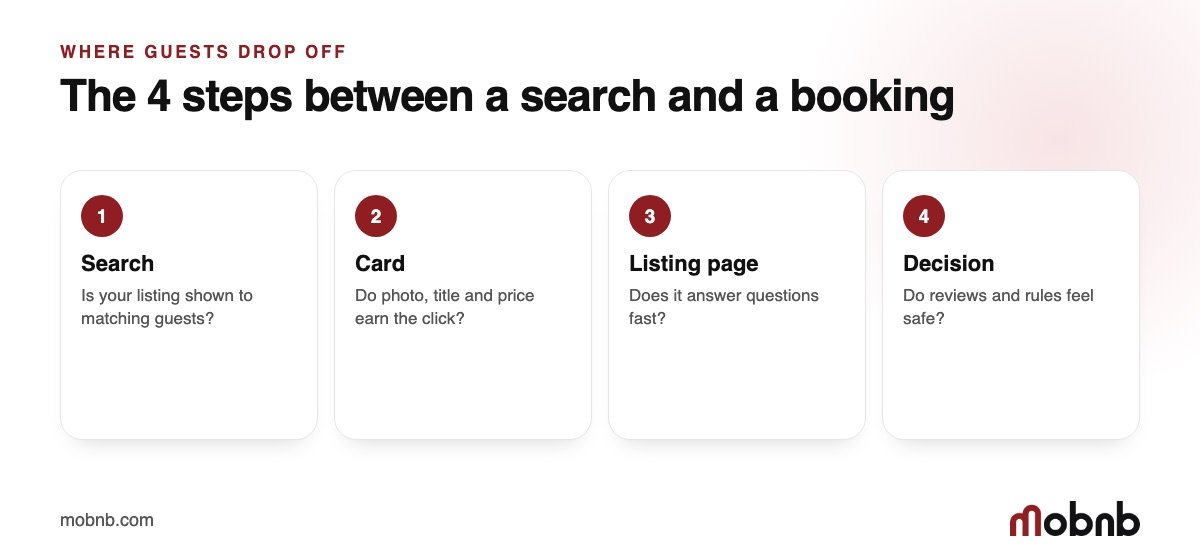
Photos are one part of a chain. A guest searches, scrolls through dozens of cards, clicks one, reads, then books. If your listing breaks the chain at any point, the photos never get a chance to work.
The booking chain, step by step
- Search: does Airbnb show your listing to guests who match it?
- Card: do the cover photo, title and price make a guest stop scrolling?
- Listing page: does the page answer the guest’s questions fast?
- Decision: do reviews, rules and the calendar make booking feel safe?
Beautiful photos help at step two and three. They cannot fix a listing that is not being shown at step one.
Where to look first
Open your Airbnb performance numbers and compare three things over the same period: how many people saw your listing, how many clicked, and how many booked. The step with the biggest drop is the one to fix. We explain this in our post on the visibility problem.
Not sure which step is leaking?
Send us your Airbnb link and we will tell you where guests drop off and what to change first.
Send your Airbnb link → · See our Airbnb promotion service on Fiverr
Common reasons a good-looking listing stays empty
- The cover photo is good but does not show what makes the place special at thumbnail size.
- The title lists features instead of telling a guest who the place is for.
- The price or the minimum stay is out of line with similar listings.
- Few recent reviews, or a gap with no bookings that lowers visibility.
- The calendar is blocked, or has rules that remove the listing from many searches.
What to do this week
- Compare your cover photo next to five competitors on a phone.
- Rewrite the title so it names the guest and the main benefit.
- Check minimum nights, availability and your price against similar places.
- Ask recent guests for a review if you have not had one lately.
If you would rather not guess, this is what a listing review is for. We look at the listing the way a traveller sees it and show you the exact fixes.
What guests actually see before they open your listing
It helps to picture the search screen on a phone. A guest types a destination and dates, then sees a column of cards. Each card shows one photo, a title, a rating and a total price. Nothing else. Your gorgeous kitchen, your fast Wi-Fi and your helpful host messages are invisible at this stage. The only things competing are the first photo, the title, the price and the star rating.
This is why hosts with excellent properties can still struggle. The listing page may be perfect, but very few guests ever reach it. Improving the inside of the listing, such as the tenth photo or the house manual, will not move the number of people who arrive.
A real-world example
Imagine two similar apartments near the old town. Host A uses a wide shot of the bedroom as the first photo and a title that says “Nice 1BR apartment in the city centre.” Host B uses a bright image of the balcony with the old town behind it and a title that says “Balcony over the old town, 3 minutes to the square.” Both have the same price, the same reviews and the same cleaning standards.
A guest scrolling quickly stops on Host B. Not because the apartment is better, but because the card answers the question “why this one?” in one second. Host A never gets the click, so the great bedroom photos never get seen.
A simple four-step fix
- Rebuild the card. Choose the cover photo that shows your single best feature and write a title that names the guest and the benefit.
- Check the total price. Compare the price after cleaning fee and taxes with three similar places.
- Open the calendar. Remove unnecessary blocks, long minimum stays and tight check-in rules, which remove you from many searches.
- Add fresh proof. Ask recent guests for reviews and answer every question quickly.
Make these changes in order and give each one a week or so before you judge it. If you change everything at once you will never know what worked.
When the listing is fine and views are still low
Sometimes you do everything right and views stay low. That happens in crowded markets, in slow seasons and with new listings that have no history. In that case the answer is not more editing, it is more traffic. Targeted promotion sends travellers who match your property straight to your listing. That is the exact job of our Airbnb promotion service, and you can read how it works in our beginner’s guide to Airbnb ads on Meta.
Ready for more guests to see your listing?
Send us your Airbnb link and we will review it, tell you what to fix and show how promotion can fill the gaps in your calendar.
Send your Airbnb link → · See our Airbnb promotion service on Fiverr
A quick self-check you can do in ten minutes
- Open your listing on your phone, in a private window, and search for your own area.
- Count how far down the page you are and what the card looks like next to the five above you.
- Ask a friend who does not know the place which card they would click, and why.
- Write down the three differences they mention, and fix the easiest one today.
Common mistakes hosts make when the calendar is empty
When bookings do not arrive, it is natural to feel pressure to act quickly. Unfortunately, several popular reactions make the situation worse. Knowing them in advance can save you weeks of lost income.
Mistake 1: changing everything at once
A host rewrites the title, swaps all the photos, drops the price and changes the calendar in a single evening. Two weeks later bookings are still low, and there is no way to know which change helped or hurt. Make one meaningful change, give it a week or two, then move on to the next. This feels slow, but it is the only way to learn what works for your property.
Mistake 2: copying the top listing
It is tempting to copy the most successful listing in your area. The problem is that guests recognise a copy, and the top listing usually has years of reviews that yours does not. Learn from the principles, such as a clear promise, bright photos and honest details, but express them in your own way.
Mistake 3: ignoring the first photo
Many hosts spend hours on the description and never test the cover photo. Yet the cover photo is the part that most guests actually see. It is the cheapest and fastest test you can run.
Mistake 4: waiting for the algorithm
Some hosts decide that Airbnb is the problem and simply wait. Waiting can work in a seasonal lull, but if your views are falling while similar listings are busy, waiting only extends the gap.
A realistic timeline
Do not expect overnight results. A typical pattern looks like this: in the first week you fix the card and the calendar. In the second week views often start to recover and clicks rise. In the third and fourth weeks bookings follow, and reviews begin to lift your visibility again. If nothing moves after a month of focused changes, it is time to add outside traffic or ask for expert help.
Questions to ask yourself every month
- Would I click on my own listing if I saw it among five others?
- Can a guest tell in two seconds who the place is for?
- Is my total price fair next to similar places?
- When did I last get a review, and did I reply?
- Is my calendar as open as it can be?
Answering these honestly takes five minutes and tells you where to start. If you answer no to two or more, your listing probably needs a refresh before anything else.
How mobnb can help with this
At mobnb we work only with Airbnb hosts. Our job is simple: get more of the right guests to see your listing and book it. In the case of an empty calendar, that usually means finding the exact step where guests drop off and fixing it before we send any extra traffic. We start with a close look at your listing the way a traveller sees it, then we tell you what to change, in order of impact.
- Listing review: we check your cover photo, title, price, calendar rules and reviews, and send you the fixes that matter most.
- Promotion: we run targeted campaigns for one property so travellers who match your place see your listing.
- Clear next steps: you always know what we changed, why we changed it and what we will test next.
You can send your Airbnb link here to get started, look at the plans and pricing, or order directly through our Airbnb promotion gig on Fiverr.
Frequently asked questions
Why is my Airbnb empty even with good photos?
Photos only help after a guest has seen and clicked your listing. If the listing is not shown often, or the title and price do not earn the click, good photos never get a chance to work.
How do I know if my problem is views or conversion?
Compare views, clicks and bookings over the same period. Low views point to visibility; plenty of views and few bookings point to the listing page, price or reviews.
Can someone review my listing for me?
Yes. Send your Airbnb link to mobnb and we will review it and tell you what to fix first.